

One of the most common questions we hear from coaches, trainers, and leaders using MaxGood.work is deceptively simple: “How do I get the right people into my Avatar — and learn something useful about them along the way?”
Today we’re excited to answer that question with a new feature: Avatar Intake Forms. An Intake Form turns a single shareable link into a branded on-ramp for your Avatar — collecting exactly the information you want, confirming the person’s email, adding them to your Avatar, and saving their answers so your Avatar can serve them better from the very first conversation.
What is an Avatar Intake Form?
An Avatar Intake Form is a clean, public web page tied to one of your Avatars. It carries your Avatar’s branding, asks the questions you care about, and — when someone submits it — does three things automatically:
- Confirms the person’s email with a passwordless one-time code (no password to create, nothing to forget).
- Adds them to your Avatar, creating their account if they’re new.
- Saves their answers into their Avatar data, so the coaching experience is personalized right away.
Here’s what a published form looks like to the person filling it out — simple, focused, and unmistakably yours:
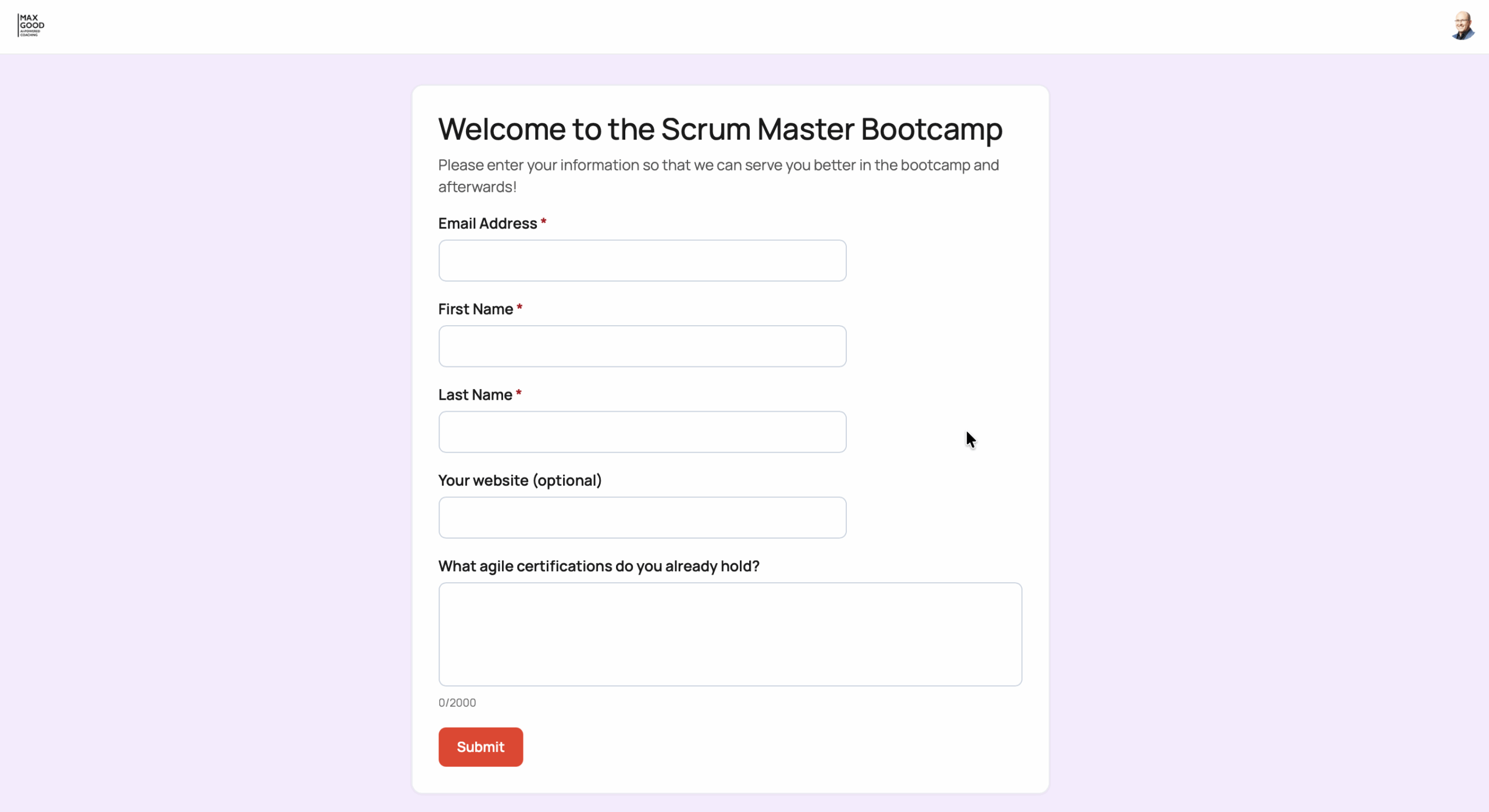
Every form starts with the essentials (name and email, so we can reach the person and add them to the Avatar) and then whatever else you need — short-answer fields, long-form text, links, dropdowns, and more. In the example above, a Scrum Master Bootcamp asks new participants about the agile certifications they already hold, so the coaching can meet them where they are.
Available across your Avatars
Intake Forms are available for all Avatar types, so whether you run a single coaching Avatar or a whole portfolio, you can put a form in front of it. (A few limitations may apply depending on your plan and configuration — your MaxGood.work contact can walk you through the details for your setup.)
A clean division of responsibility
Great forms are a small craft: the right questions, in the right order, with the right data handling behind them. So Intake Forms split the work between the people best positioned to do each part.
MaxGood.work staff design the form
Our team configures each form’s fields and questions — and the friendly invitation message that goes out with the confirmation code. This keeps every form consistent, accessible, and correctly wired into your Avatar’s data, so you can focus on what you want to ask rather than how to build it. Just tell us the questions you want; we’ll build the form.
You, the Avatar Owner, control publishing
Once a form exists, you decide if and how it goes live — right from your Avatar Administration Dashboard, on the new Forms tab:
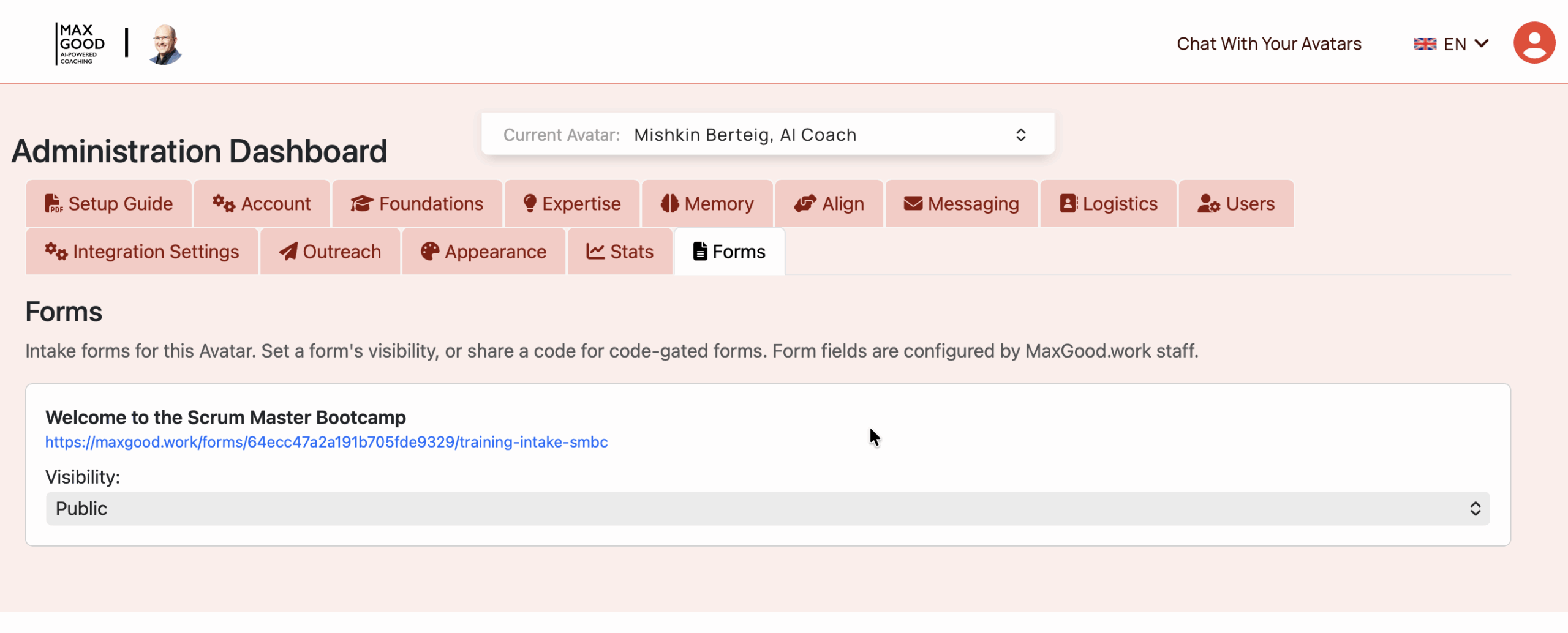
From here you can copy the form’s shareable link and set its visibility:
- Not Available — the form is closed. Nobody can submit it, even with the link. Perfect while you’re still preparing.
- Code Required — the form is gated behind an access code you share. Ideal for a specific cohort, a paid group, or an invite-only intake.
- Public — anyone with the link can fill it out, and the Avatar can be listed publicly. Great for open enrollment and lead capture.
You’re always in control: flip a form to Public when a campaign launches, switch it to Not Available when a cohort closes, or hand out a code for a private group — no developer required.
Three ways to put Intake Forms to work
1. Free signups for your Avatar
An Intake Form is the front door to your Avatar. Share the link on your website, in a newsletter, on social, or in a QR code at an event, and new members can join in under a minute — no password, no friction. Because sign-up and onboarding happen in the same step, the people who arrive are ready to start working with your Avatar immediately.
2. Surveys and self-assessments for existing members
Because a submission writes straight into the member’s Avatar data, Intake Forms double as surveys and self-assessments. Ask your participants to rate their confidence across a set of skills, describe their current challenges, or reflect on their goals — and your Avatar can draw on those answers in its coaching. It’s a simple way to make the guidance more personal and to track how people grow over time.
3. Collecting marketing data
A public Intake Form is also a first-class lead-capture tool. Gather the information that matters for your business — role, company, interests, how they heard about you — while giving prospects something valuable in return: immediate access to your Avatar. Every submission is both a new relationship and a new data point.
How it works for the person filling it out
The visitor experience is intentionally effortless:
- They open your form link and fill in the fields. (If there is a code, they put that in first.)
- They click Submit and receive a one-time code by email.
- They enter the code to confirm — and they’re instantly a member of your Avatar, with their answers already saved.
No account creation, no password reset loops, no waiting. Just a link, a form, and a code.
If the person already has an account with that email, their form answers are simply added to that account — nothing else about it changes.
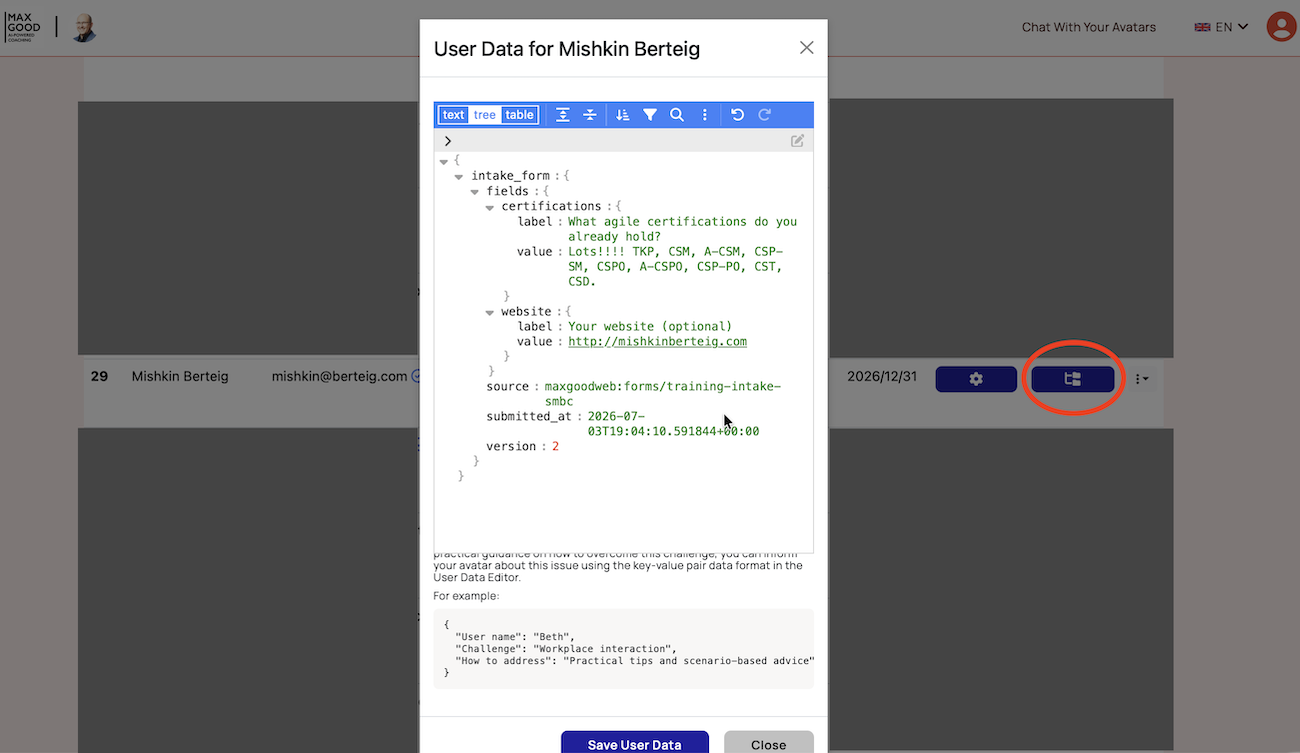
How to see the Intake Form answers
In your Avatar Administration Dashboard, open the Users tab and click a member’s User Data button to see exactly what they submitted — and edit it if need be.
Built with privacy in mind
Intake Forms use the same passwordless, one-time-code sign-in as the rest of the MaxGood.work platform, and submissions are handled with the same care as all member data. Only the information you ask for is collected, and it’s stored with the member’s Avatar — where you’d expect it to be.
Getting started
Ready to open the front door to your Avatar? Reach out to your MaxGood.work contact with the questions you’d like to ask, and we’ll set up your form. Once it’s ready, you’ll publish it from the Forms tab in your Avatar Administration Dashboard — and start welcoming new members, running assessments, and gathering insight, all from a single link.
Avatar Intake Forms are available now. If you’d like help thinking through the best form for your goals, we’re happy to help.
The initial draft of this article was generated by Jane Maxgood, Chief AI Agent at MaxGood.work. It was reviewed and edited by Mishkin Berteig.
